Correct pad selection requires considering several factors: artwork dimensions and type,
shape of the printed object's surface, ink type, pattern type on the plate,
and available pad printing machine (sometimes also the material being printed on).
Choosing the correct shape requires understanding the printing process. The decision depends on: artwork dimensions and type,
shape of the printed object's surface, ink type, pattern type on the plate, and available pad printing machine.
The optimal contact angle between the object's surface and the pad wall is 20°–50°.
A pad with appropriate height compresses more easily than a short one, more effectively limiting distortions.
Every TOSH pad is manufactured from precisely selected silicone with specific mechanical and chemical properties. Standard hardnesses are 6 and 8 Shore A, but on request we produce pads of any hardness — tailored to the requirements of a specific part and production line.
The higher the Shore A value, the harder the pad. Hard pads ensure better coverage and sharpness
for thin artwork; soft ones are intended for large surfaces, delicate objects, and strong curves.
* Other hardnesses are produced on special request.
For each silicone, custom hardness can be made according to production requirements.
New pads have excess silicone oil on the surface, which repels printing ink.
Before first use, it is necessary to degrease the working surface using
one of the dedicated solvents:
When working with objects at extreme angles or curves, the pad may suffer
physical damage after just 1,000–5,000 cycles.
After an 8-hour work cycle, we recommend pad rest — rubber regenerates its physical properties.
Store away from heat sources and sunlight, in a closed cabinet.
Cover the working surface with a thin layer of TOSH 05S silicone oil.
Pad shape — key to quality
The shape of the printed object is the main factor determining pad shape.
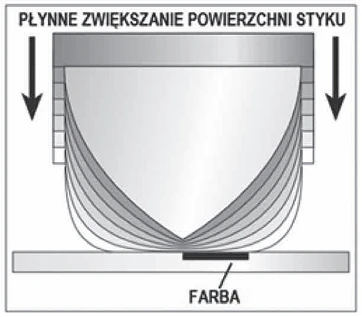
A pad should have rolling action — it is compressed on the plate surface
and printed object simultaneously. Smooth increase of contact surface begins
at the apex point and moves outward, pushing out air from between the pad
and the plate/part.
We aim to transfer the image without creating a zero angle between the pad and the surface
to which it is pressed. The pad must be steep enough to compress appropriately
strongly — to pick up the entire image and transfer it without trapping air.
The steeper the pad angle and the greater its mass, the better.
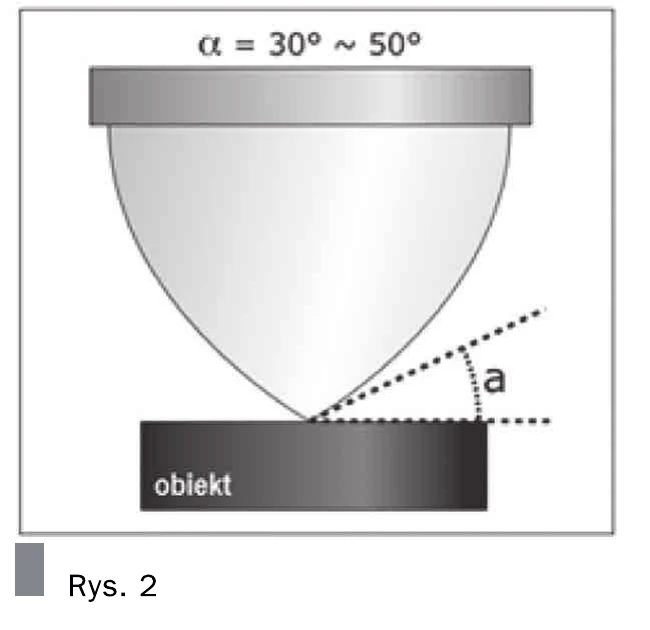
Departure angle (α): The main parameter increasing smooth contact surface
of the printing surface is the pad's departure angle. The best printing results are achieved using pads
with a large approach angle. Optimal range: 30°–50°.
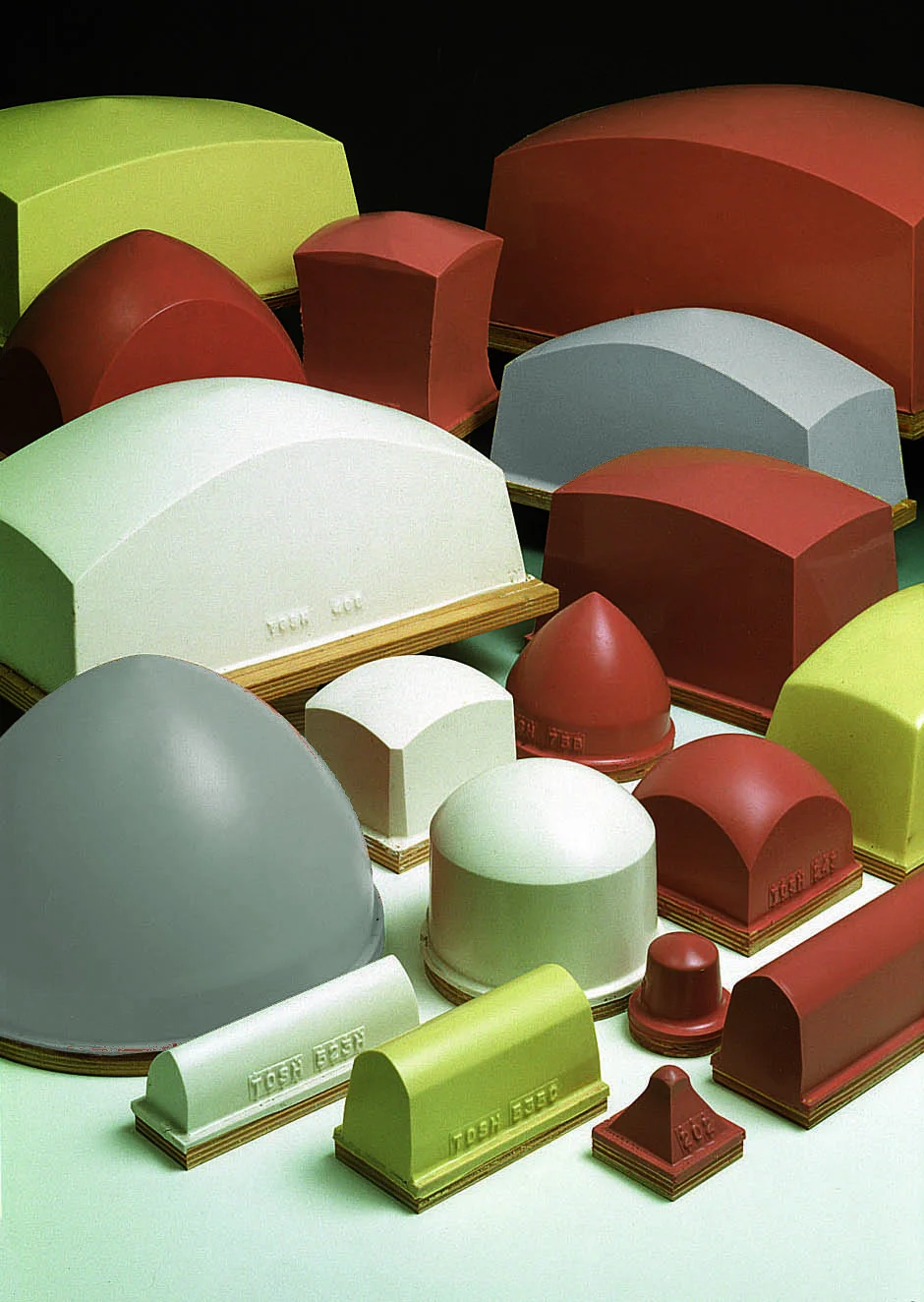
Base shapes
In pad printing, only a few shapes are considered basic. Subsequent variants in supplier catalogs
are developments of base shapes:
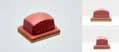
Square and rectangular — most popular on the market alongside circular.
You can print successfully on the same products using these two shapes interchangeably.
Rectangular pads with a large departure angle have two departure planes, which introduces
variables to image distortion.
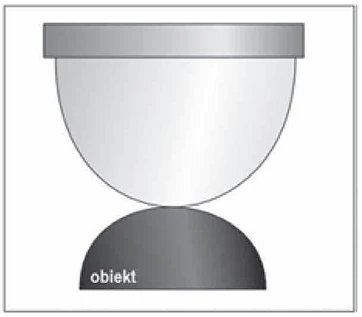
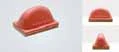
Circular — preferred when they provide the most concentric compression.
If the print undergoes distortion in this case, it is relatively uniform.
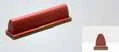
Boat (saddle) — a modified pad with a rectangular shape, designed
to enable transfer of linear artwork. Classic application is printing on pen bodies
and clips. They print from their apex and due to the greatest pressure at that location,
transfer ink poorly from that area.
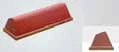
V-shaped — formed so the apex has a sharp edge. Image transfer
occurs on one or the other side of the apex. When one side wears out, we rotate
the pad 180° and use the other side.
Non-standard (special) — hybrid designs incorporating one or more
of the four basic shapes. Special pads are created from scratch for specific
orders and specific projects.
Image location on pad
Image location on the pad is very important. During compression, the apex point can
trap air, so it reaches zero deflection quickest. For this reason, it is recommended to
avoid placing the pad apex directly on the image, unless absolutely
necessary. Choosing pads must very often be treated as a compromise art.
Inexperienced operators often place the apex point at the image center, creating
transfer quality problems. If you cannot change the pad position due to mechanical limitations
— change the image position on the plate.
Principle: The pad apex is always a critical zone, especially for
plates without screening. The apex should, if possible — always be outside the pattern.
A pad with departure angle >50° will cause high pressure on the screened plate,
which is the most common reason for uneven ink pickup.
Pad size
The size of the printed image and the size of the pad printer used determine the optimal
pad size. When determining size, we are always guided by the rule: "Bigger is better".
The diagonal of the printed image should reach a maximum of 80% of the length, width, and diagonal dimension
of the pad. Larger values can result in image distortions during
pickup or transfer.
The parameters of the machine used and the size of the plate are also important. The pad printer must be able to
effectively press the pad hard enough to pick up and transfer the entire image. The process should
proceed without contact with any part of the machine (ink cup holder, plate, etc.).
Note: A pad with a smaller departure angle may threaten print quality.
However, a pad with incorrect size increases the possibility of transferred image distortion
and through a higher degree of compression also reduces its overall durability.
It is recommended that the pad be approximately 30% larger than the artwork to be printed.
Pad hardness — Shore scales
Pads consist of liquid base material, silicone oil, and catalyst. The amount of base material
determines the pad's mass. The amount of oil added to the base determines its hardness, and the catalyst
allows the pad to cure in the mold. Pad color may come from the base material
or catalyst.
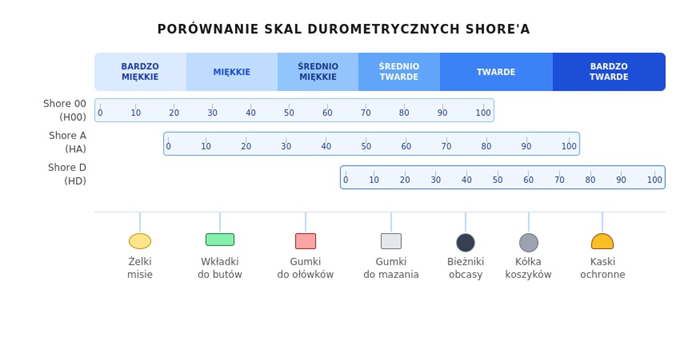
In pad printing, pad hardness is measured in Shore degrees. Albert F. Shore invented
around 1915 an instrument called a durometer. For soft materials, hardness testers
of types 00 and A are used. In pad printing, the A scale is primarily used, although for very soft pads
(e.g., for printing on Christmas ornaments), the 00 scale is used. The most commonly encountered range
is A scale — 4–15 ShA.
We achieve the best print quality using hard pads. They have greater ability
to pick up more ink from the plate and the same etch depth as their
soft counterparts. Consequently, this allows better coverage on
transparent surfaces. Soft pads work best on large printing surfaces
and curved and convex surfaces, and are also invaluable in printing
delicate objects.
Compression: Excessive compression can cause achievement of 0° angle regardless of the angle
of pad inclination — this traps air between the pad surface and the plate,
which consequently means the finished print will have empty spaces. Basic principle:
use the smallest possible pressure that picks up and delivers the entire print.
Recommended pad pressure
One of the common mistakes made by new operators is applying excessive
pressures. We recommend using minimal pad pressure to pick up and print the image.
By using minimal force, we reduce pad wear and limit image distortions
from excessive deflection.
The way to determine the minimum sufficient pressing force is trivially simple, especially with TOSH numeric machines:
after achieving satisfactory transfer of the entire image, reduce the pad pressure on the plate
until the pad stops transferring the entire image onto the part. When this value is reached,
increase the pressing force by 1 mm to ensure complete transfer in each cycle.
Similarly, we proceed with setting the pressure of the pad on the part.
Mounting bases
For stable and repeatable mounting of soft silicone rubber, the pad is always placed
on some type of base. They can be made of wood, aluminum, steel, or plastic. Depending on the type of fastening,
wooden bases contain threaded inserts placed in the central part. Aluminum bases are almost always threaded
— the most common thread size is 5.6 or 8 mm with metric pitch.
Important: The method of fastening with wood screws works poorly in
advertising firms where production volume is large — it makes repeatable screwing of the pad difficult.
The issue of screws and wooden bases can be easily solved by choosing a supplier using
high-quality wooden bases or threaded inserts,
or magnetic adapters allowing immediate pad exchange.
Printing surface finish
Common practice among manufacturers is to supply silicone pads with high gloss.
However, it turns out that pads with a satin printing surface transfer ink better.
However, achieving a uniform satin surface is much more difficult in the manufacturing process,
so suppliers often forgo it — we more often encounter glossy pads.
The greatest noticeable difference can be seen when printing large, uniform opaque surfaces.
Ink is transferred more easily and its surface is more uniform. If we have
a new matte pad from a supplier who knows what they're talking about, let's not be afraid to use it.
Pad activation and cleaning
Before pads can be used effectively, they must be "activated". In most
cases, activation is done by removing excess silicone oil (which also
gives the gloss). Pad activation is intended to enable good ink pickup and transfer
during the printing process.
Usually a strong solvent is used (such as an accelerator) that initially removes excess
silicone oil. It is also permitted to use the solvent used in the ink cup.
Using too much can damage the pad and reduce its lifespan.
At the start of production, the best method of cleaning the pad (to remove solid contaminants, dried ink, and dust) is using high-quality packing tape. Industrial
pad printers equipped with a pad cleaning module work on the same principle — the pad
is pressed onto a platform covered with an unrolled piece of tape. In this case, the tapes are much higher quality,
which allows their repeated use.
Signs of wear: A Hi Opaque pad made of gray silicone will have a yellowed
printing surface, while a red-colored pad will have a paler shade at the point
of transfer of a given pattern. Another sign is microporosity of the printing surface —
damage such as cuts to the printing surface usually completely eliminate
the pad from further use because they introduce non-linear image distortions. By following
these simple observations, and activation and cleaning principles, you will improve
print quality, reduce downtime, and extend pad lifespan.
Pad durability
In many applications, a silicone pad can withstand even 250,000 prints,
and exceeding 50,000 prints is common.
Conversely, some pads are
completely destroyed before they even print a single part. Such a disaster usually occurs
during machine setup, when pad pressure was set too high a stroke distance.
The pad strikes hard against the plate or ink cup holder — the result can be complete pad destruction,
scoring or destruction of the printing surface, in critical cases its tearing.
Pad durability is also affected by inks containing aggressive solvents or hardeners, which
during printing will be absorbed by the pad. Inevitable solvent absorption will cause
"swelling" of the image area on the pad, which will ultimately affect print quality. In that case,
stop the machine and replace the "swollen" pad with another one of the same model — after solvent evaporation,
the pad will return to its original size. By following the shift principle, we will achieve the longest
pad lifespan.
Transport and storage
The pad surface is most sensitive to mechanical damage. Any imperfection
of this plane can end up in the print field, resulting in a print of lower than expected
quality. Transport of pads should be carried out with special care.
Some manufacturers use covers protecting the transfer surface, others glue
pads with hot glue to the surface of rigid cardboard. One must categorically avoid
placing pads on their printing surface.
The best storage conditions are a temperature around 18°C, a dark place,
not exposed to sunlight or temperature changes. The silicone oil contained
in the silicone mixture is crucial for the pad's transfer properties.
In the case of storing the pad close to heat sources, the oil evaporates from the silicone
— it may turn out that even a pad after 12 months will no longer have such
good transfer properties.
Pad quality control
Low-quality consumable materials can ruin the chances of achieving high
quality prints. Pads should be manufactured in a clean environment, the silicone mixture used
should not have flaws on the print surface, foreign bodies and chips from
wooden or aluminum bases are not allowed. Silicone rubber should be well vulcanized
with the base. There should be no air bubbles around which could cause uneven
deflection or detachment of the pad from the base.
Depending on the hardness tester used, deviations should not exceed ±5
(on the 00 Shore scale) and ±1–2 (on the Shore A scale). Each pad should be properly
and durably marked, so even after a year it is possible to identify the model, hardness,
and supplier.
Rotary pads
Rotary pads are usually completely round, solid. In cases where photopolymer plates are used,
they are cut to avoid compressing the clamps holding
the plate in the drum. This type of pad is characterized by much greater hardness (45–55 ShA),
and their silicone part, depending on the rotary pad printer design, can be replaced
by the user. These pads are subject to the same usage guidelines as traditional ones.
Textured surface printing
Printing textured surfaces requires experience, and perhaps above all knowledge.
Every operator who calls themselves a pad printing technician should know the principles and be able to handle
printing basic textured surfaces.
Some textures simply cannot be filled using pad printing, regardless of
how hard or sharp a pad we use. The main limitation is depth and the grain used
in texturing — usually too large. In the case of textures with small depth,
understanding helps — pad printing is the transfer of a liquid decal from a two-dimensional surface
to a three-dimensional one.
Directing warm air flow onto the pad combined with two- or three-pass
printing can prove to be a lifesaver. Air blasts cause partial ink drying
through solvent evaporation, which increases efficiency and ease of ink transfer
from the pad to the printed part.
Summary — practical tips
Correct pad selection is crucial for achieving the best printing results.
Common sense, practical experience, and continuous experimentation will make you a high-class
pad printing technician. Using the tips below, you will select the right pad
for a specific task:
1. Choose a pad large enough to be able to compress it manually over the printed product.
Observe if the contact surface increases smoothly — it should spread outward and downward,
completely covering the print area.
2. A small test resulting in error, and then conclusion, is the best method in pad printing
to really determine whether the selected pad can meet our expectations.
3. The essence of the pad selection process is openness to shapes. Remember the basic rule
"bigger is better" — an unconventional pad shape can sometimes solve a printing problem.
4. Poor print quality or uneven ink pickup usually means that air
is trapped between the pad and the plate — this is the result of insufficient smooth increase
of contact surface.
5. Hard pads are best suited for difficult, textured surfaces.
Soft ones work well on surfaces with distinct contours, and are also indispensable when printing
on objects sensitive to pressure and brittle.
6. Try to position the pad so its apex does not contact the image area
on the plate. Air tends to get trapped at the apex.
7. Do not use pads with drastically different hardnesses — this problem is especially apparent
in multi-color printing. All halftone pads should be the same shape.
8. Never start a print cycle on a pad printer with an empty part holder —
sharp edges can cut the pad in the first cycle.
9. Store pads in a cool, dry, and dark place.
Remove the plastic protective cover, if provided with the pad.
Based on a series of articles "Printing pads — criteria for proper selection"
Radosław Grabski · Świat Druku (copying and use without the author's knowledge is prohibited)
If you don't find a pad in the catalog that meets your requirements — this doesn't mean
we can't provide it. In such cases, we realize projects on special order.
Using 3D computer-aided modeling (CAD), we are able to design
and manufacture a pad with virtually any shape — both from scratch and through modification
of an existing solution. To ensure full compatibility, we only need basic
technical information (e.g., dimensions, mounting method, reference photo or drawing).
The wooden bases of our pads, along with all necessary technological holes,
are cut by laser. This ensures high precision and full repeatability, which translates to
reliable and stable mounting in any pad printer. Standard base thickness is 8 mm,
which allows durable mounting using wood screws.
Each pad is equipped with a threaded insert, allowing quick and convenient mounting
using an M6 screw in the central part. Additionally, on the bottom there is a durable engraving
containing the model number and hardness — thanks to which identification is possible even
with significant pad wear.
For more advanced needs, we also offer custom markings:
numbering according to the client's system, special markings, as well as barcodes supporting
logistics and production management.
In short — if you have an unusual part to print, we are able to adapt
the right pad to it.